claude+: The Project Chooser That Changed My Claude Code Workflow
If you use Claude Code for more than a couple of projects, you'll quickly hit the same problem I did: managing all those sessions is a mess.
Claude Code stores session data under ~/.claude/projects/, but the directory names are mangled path encodings, not human-readable project names. Want to resume where you left off on that website you were building yesterday? Good luck remembering whether it was -home-tlarcombe-projects-larcombe-tech or one of the other 75 session directories sitting in there.
So I built claude+.
What It Does
claude+ is a simple bash script that gives you an interactive, fuzzy-searchable project picker for all your Claude Code sessions. Type claude+ instead of claude and you get this:
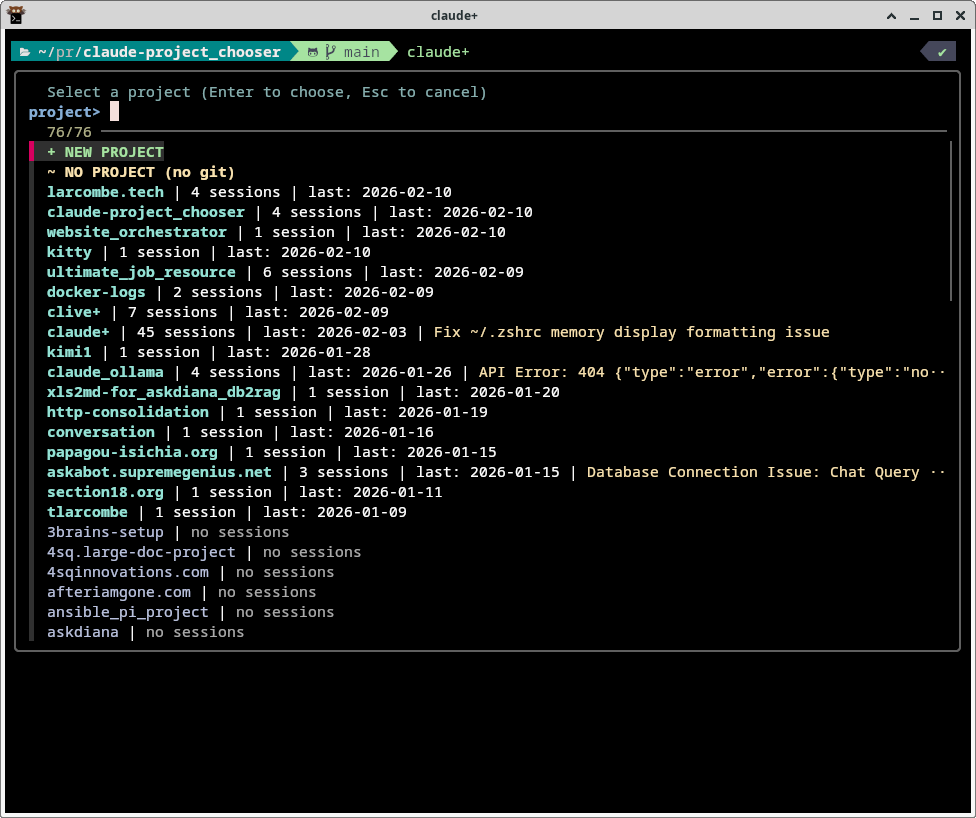
Every project you've ever used with Claude Code, sorted by most recent activity. At a glance you can see:
- Project name - the actual directory name, not a mangled path
- Session count - how many times you've worked on this project
- Last activity date - when you last touched it
- Session summary - what you were last working on
Projects with existing sessions appear at the top in cyan. Projects in your ~/projects/ directory that don't have sessions yet appear below in grey.
Why It Makes My Life So Much Easier
I have 76 projects. Some I work on daily. Some I haven't touched in weeks. Before claude+, my workflow was:
- Open a terminal
- Try to remember the exact project directory
cd ~/projects/somethingclaude --continue- Hope it picks up the right session
Now it's:
- Type
claude+ - Start typing the project name (fzf fuzzy matches instantly)
- Hit Enter
That's it. Three keystrokes and I'm back exactly where I left off. The session summaries are particularly useful - when you see "Fix ~/.zshrc memory display formatting issue" next to a project, you immediately know what you were doing and whether that's the session you want to resume.
Creating New Projects
The + NEW PROJECT option at the top does the sensible thing: asks for a name, creates the directory under ~/projects/, runs git init, creates an empty CLAUDE.md, and launches Claude Code. One command, zero friction.
There's also a ~ NO PROJECT option for those quick one-off queries where you just want Claude without a project context.
How It Works
Under the hood, it's straightforward:
- A Python script scans
~/.claude/projects/and parses the session index files to extract real project paths, session counts, dates, and summaries - It also scans
~/projects/for any directories that don't have sessions yet - The combined list is piped into fzf for interactive fuzzy selection
- When you select a project with existing sessions, it launches
claude --continueto resume where you left off - For projects without sessions, it starts a fresh Claude Code session
The entire thing is a single bash script with an embedded Python block. No dependencies beyond fzf and python3, which you almost certainly already have.
Installation
Two lines:
cp claude+ ~/.local/bin/claude+
chmod +x ~/.local/bin/claude+
That's the entire install process. No npm, no pip, no build step.
Get It
claude+ is open source and available on GitHub:
If you're using Claude Code across multiple projects - and if you're serious about AI-assisted development, you should be - claude+ removes one of those small daily frictions that quietly eats your time. It's the kind of tool that, once you have it, you can't imagine going back to the old way.